Banana Pi F3
Christmas project: I got a Banana Pi F3 on the cheap and used the quiet hours to power it up, take inventory, and write a technical first look. This post is deliberately terse and focused on what matters to Linux developers and performance engineers.
TL;DR: Octa-core 64-bit RISC-V with RVV 1.0 (256-bit), two coherent clusters, sensible caches, usable PCIe and I/O. Treat the GPU and video items as hardware capability; the Linux userspace stacks may lag.
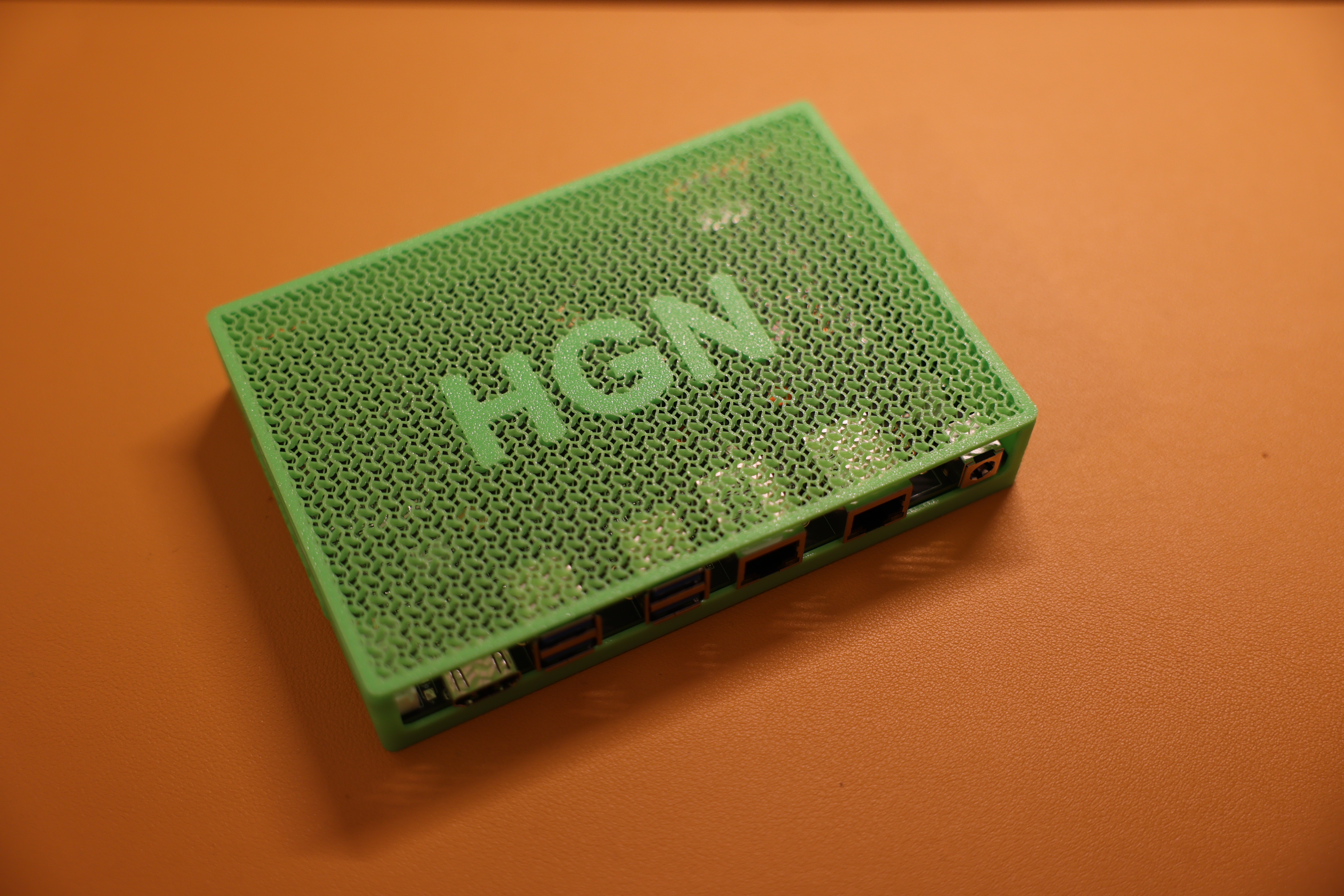
My Banana Pi in a 3D printed case:
SoC and microarchitecture
The F3 is an octa-core 64-bit RISC-V SoC from SpacemiT. The vendor claims about single-core speed vs Cortex-A55 are marketing-level. The concrete properties that matter:
Core pipelines: eight-stage, dual-issue, in-order. Expect predictable behavior, but little headroom to hide long latencies.
Clusters: two clusters (X60), each with four 64-bit application cores.
Vector ISA: RVV 1.0 with maximum vector length (VLEN) 256 bits.
Profiles and base ISA: targets the RVA22 application profile (RV64G with the usual A, C, D, F where applicable).
Caches and coherency:
- Per core: 32 KiB L1-I and 32 KiB L1-D
- Per cluster: 512 KiB L2
- L1 uses MESI, L2 uses MOESI
- 512 KiB TCM per cluster for low-latency scratch
Practical scheduling note: Linux exposes a single NUMA node, but L2 locality is per cluster. Pin related threads within one cluster for L2 reuse.
Topology snapshot with hwloc on my unit:
$ hwloc-ls
Machine (3809MB total)
  Package L#0
    NUMANode L#0 (P#0 3809MB)
    L2 L#0 (512KB)
      L1d L#0 (32KB) + L1i L#0 (32KB) + Core L#0 + PU L#0 (P#0)
      L1d L#1 (32KB) + L1i L#1 (32KB) + Core L#1 + PU L#1 (P#1)
      L1d L#2 (32KB) + L1i L#2 (32KB) + Core L#2 + PU L#2 (P#2)
      L1d L#3 (32KB) + L1i L#3 (32KB) + Core L#3 + PU L#3 (P#3)
    L2 L#1 (512KB)
      L1d L#4 (32KB) + L1i L#4 (32KB) + Core L#4 + PU L#4 (P#4)
      L1d L#5 (32KB) + L1i L#5 (32KB) + Core L#5 + PU L#5 (P#5)
      L1d L#6 (32KB) + L1i L#6 (32KB) + Core L#6 + PU L#6 (P#6)
      L1d L#7 (32KB) + L1i L#7 (32KB) + Core L#7 + PU L#7 (P#7)
Implications:
- Use core pinning to keep communicating threads inside one cluster when L2 reuse matters.
- In-order, dual-issue cores want clean dependency chains, good prefetching, and minimized branch mispredicts. Vectorization pays off where possible.
RAM and storage
LPDDR3, dual chip-select, 32-bit bus, up to 4 GiB, about 1866 MT/s. Bandwidth and latency are modest compared to LPDDR4x.
Non-volatile options:
- SPI NOR flash for boot
- eMMC 5.1
- SDIO 3.0 (microSD)
- NVMe over PCIe
Recommendation: boot from SD or eMMC, but put the rootfs on NVMe if you can spare lanes. It improves IOps and tail latency for builds and CI.
GPU, video, and display
Hardware capability sheet lists:
- 3D engine: OpenCL 3.0, OpenGL ES 3.2, Vulkan 1.2
- Video: up to 4K H.265, H.264, VP9, VP8 encode/decode
- Dual display: MIPI-DSI and HDMI up to 1920x1440 at 60 Hz
Reality check for Linux: availability of mainline DRM/KMS, Mesa, and stable VA-API or V4L2 mem2mem paths is the gating factor. For headless build boxes and routers, no issue. For Wayland and Vulkan, evaluate the vendor kernel and userspace stack first.
I/O and buses
- PCIe 2.1: five lanes total, arranged as x2 + x2 + x1 (5 GT/s per lane).
- USB: 1 x USB 3.0 via PCIe x1 combo, plus 2 x USB 2.0 (OTG + host).
- Networking: 2 x 1 GbE MAC (RGMII).
- Peripherals: 4 x SPI, 7 x I2C, 12 x UART, 2 x CAN-FD, 30 x PWM.
The x2 + x2 split is useful: NVMe on one x2 group and still another x2 device, while the x1 lane backs USB3.
Power and thermals
- SoC power envelope about 3 to 5 W under typical operation.
- Input power via USB-C; PoE is possible depending on carrier.
- Heatsink recommended. Add a small fan if you run all-core vector workloads for long periods.
Linux bring-up notes
Boot chain: BootROM -> OpenSBI -> U-Boot -> Linux with DT hand-off.
Rootfs: any riscv64 rootfs works if the kernel and DT are correct. Vendor images are fine for a quick start. For development, prefer a generic Debian or Ubuntu riscv64 rootfs on NVMe or eMMC and a self-built kernel.
Toolchains: riscv64-linux-gnu GCC or LLVM are fine. For RVV, ensure the compiler supports RVV 1.0 and use -march=rv64gcv and an appropriate -mabi (lp64d is typical).
CPUFreq and CPUIdle: check exposure and defaults.
- Look for schedutil first, otherwise ondemand.
- Verify deep idle and broadcast timer behavior on these in-order cores.
Minimal serial and storage setup:
# Serial console
screen /dev/ttyUSB0 115200

# Identify target device for imaging
lsblk

# Write image (replace X)
sudo dd if=image.img of=/dev/sdX bs=4M conv=fsync status=progress
For NVMe rootfs, keep /boot on the medium the firmware loads from (often SD or eMMC) and point U-Boot to the NVMe root via bootargs.
What RVV 1.0 at 256-bit buys you
If your code or libraries have RVV back ends:
- Throughput scaling for data-parallel loops with regular strides: audio, image filters, quantized ML pre and post, some crypto.
- Length-agnostic vector code: do not hardcode width. Query VLEN or use portable intrinsics. Build with -march=rv64gcv and verify the runtime environment.
- Check that Linux exposes the V extension:
grep -o ' v ' /proc/cpuinfo || echo "No RVV exposed to Linux"
Then confirm with objdump and perf that vector instructions are actually used.
Networking notes
Two 1 GbE MACs help for simple routers or OOB links. For line rate:
- Watch DMA descriptor handling and cache maintenance on in-order cores.
- Tune IRQ moderation and NAPI budget.
- Pin RX/TX workers and kthreads coherently to avoid cross-cluster chatter.
Use ethtool -S, nstat, and perf top to find bottlenecks.
Storage notes
Prefer NVMe on x2 for rootfs when possible. Filesystem defaults:
- ext4 with lazytime and a sane commit interval is fine.
- Use fio with realistic queue depths and a working set larger than RAM to measure tail behavior.
Benchmarking plan
No numbers here, only a reproducible plan to probe the platform.
System inventory and baselines:
uname -a
lscpu
cat /proc/cpuinfo
hwloc-ls --lstopo text
cat /proc/cmdline
grep . /sys/devices/system/cpu/cpufreq/policy0/* 2>/dev/null | sed 's/^/cpufreq: /'
Scalar and memory behavior:
- Integer and FP: openssl speed rsa2048 sha256 (scalar heavy), bzip2 -k9 on a large file, xz -T8 for pipeline plus memory stress.
- Memory bandwidth and latency: STREAM built for riscv64; measure 1 to 8 threads and compare in-cluster pinning vs cross-cluster.
- Branch behavior: a small branch-mispredict microbenchmark to see recovery costs on in-order cores.
Vector (RVV) checks:
- Build a simple RVV microkernel (SAXPY, GEMV, or a 3x3 image box filter) twice: with and without -march=rv64gcv.
- Verify vector opcodes with objdump and instruction sampling via perf record and perf report.
- Compare throughput per MHz, not just wall time.
Storage:
fio --name=seqread --rw=read   --bs=1M  --iodepth=8  --size=4G --filename=/mnt/nvme/testfile
fio --name=randrw  --rw=randrw --bs=4k  --iodepth=32 --size=4G --rwmixread=70 --filename=/mnt/nvme/testfile
Networking:
# Host A
iperf3 -s
# Host B
iperf3 -c <server> -t 60 -P 4
Record CPU load with pidstat -tur and hotspots with perf top.
Power and thermal:
- No RAPL. Use an inline USB-C power meter or PoE power monitor for wall measurements.
- Record idle, single-core steady, all-core steady, and RVV steady. Note governor, frequency caps, ambient, and cooling.
Scheduler and topology sensitivity:
- Pin 4 threads within one cluster vs 8 threads across both clusters. Compare L2 miss rate and throughput with perf stat and perf mem.
Closing
As a developer board, the Banana Pi F3 is interesting because it combines RVV 1.0 (256-bit) with a coherent dual-cluster design and usable PCIe. Keep expectations realistic around graphics and codec userspace maturity, use NVMe for sanity, and be topology-aware when chasing the last 10 to 20 percent.
If you have hard data from vendor kernels or mainline snapshots that change any caveats above, open an issue or PR.